

RFID vs Keypad vs Fingerprint vs App: Choosing Gate Access Control in Kenya
A motor gets your gate moving, but access control decides who’s allowed to move it — and this is the decision most people give far less thought to than the motor itself, despite it mattering just as much day to day. Get it right, and entry is fast and frictionless for the people who should have it. Get it wrong, and you’re either dealing with lost cards, forgotten codes, or a system too complicated for staff and family to actually use consistently. Here’s how the four main options actually compare.
The Four Main Access Control Options
RFID cards or tags work by tapping or waving a small card or key fob near a reader, which recognises the card’s unique code and triggers the gate. Keypads require entering a numeric PIN code, no physical card needed. Fingerprint readers use biometric scanning — a registered fingerprint opens the gate, with no card or code to carry or remember at all. And smartphone app control lets you open the gate remotely from your phone, often alongside remote monitoring and activity logs, typically built into smart-enabled motor systems like the Centurion Smart Series.
Not sure which fits your property? Call or WhatsApp us on +254 722 708034 and we’ll recommend a setup based on how many people actually need access.
RFID Card Access: Best for Managing Multiple Users
RFID is the standard choice for properties needing to manage access for a defined group of people — households with staff, apartment complexes with dozens of residents, or offices with regular employees. Each card can be individually registered and, just as importantly, individually deactivated if lost or if someone’s access needs to be revoked, without affecting anyone else’s card. This is a genuine advantage over shared codes, where a departing employee or former tenant knowing the code means the whole system needs resetting.
The trade-off is the physical card itself — it can be lost, forgotten at home, or shared with someone who shouldn’t have access, and a lost card needs to be deactivated promptly to stay secure. For multi-unit residential properties and any site with regular staff turnover, RFID remains one of the most practical options available, and it’s what we installed for a Kileleshwa apartment complex managing entry for around 60 residents.
Keypad Entry: Simple, No Cards to Lose
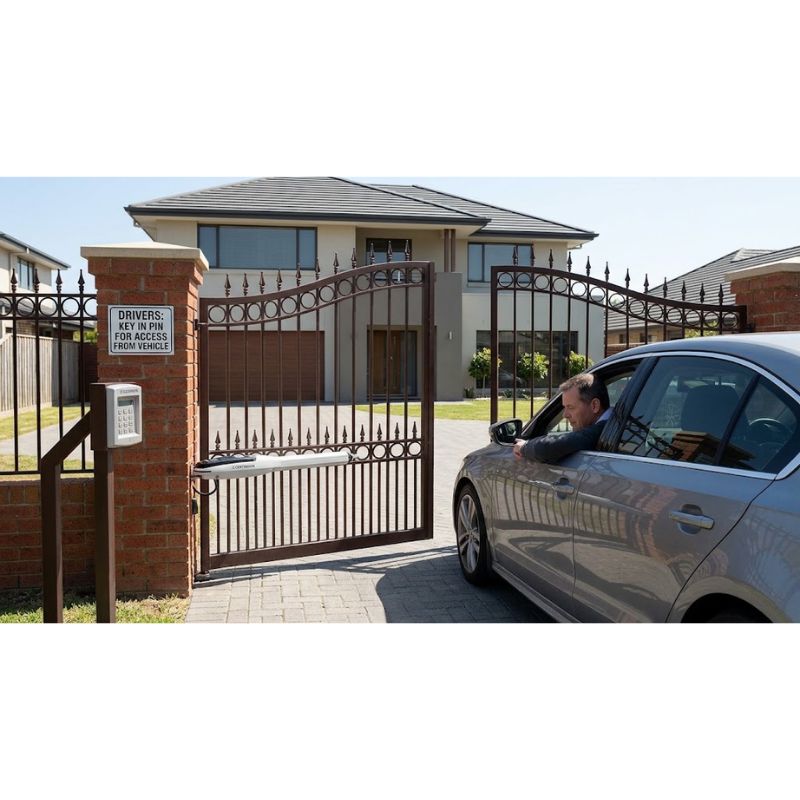
Keypad access removes the lost-card problem entirely — there’s nothing to carry, and visitors or delivery staff can be given a temporary code without needing to hand over any physical item. It’s a straightforward, low-cost option that suits smaller households or properties with a stable, small group of regular users.
The main limitation is that a shared PIN code is only as secure as the people who know it — codes get shared, remembered by people who should no longer have access, and changing a compromised code means re-communicating it to everyone who legitimately needs it. Keypads work well as a standalone system for simpler needs, or as a backup access method alongside RFID or app control on more comprehensive systems.
Fingerprint Access: No Cards, No Codes, No Sharing
Biometric fingerprint access solves the sharing problem that both cards and codes have — a fingerprint can’t be lent to someone else or left at home. It’s an increasingly popular choice for homeowners wanting a genuinely personal access method, and for properties where a small, fixed group of people (a family, a small staff team) need reliable, individual access without managing physical credentials.
The consideration worth being upfront about is that fingerprint readers work best for a relatively fixed, smaller user base — registering and managing fingerprints for a large or frequently changing group of users (a big apartment complex with regular tenant turnover, for instance) is more administratively involved than issuing and deactivating RFID cards.
Smartphone App Control: Remote Access and Monitoring
App-based control, available on smart-enabled systems like the Centurion Smart Series and Vantage Smart, lets you open your gate from anywhere with an internet connection — genuinely useful for letting in a visitor or delivery while you’re not home, or for property owners managing a second home or rental property remotely. Many systems also provide activity logs, showing exactly when the gate was opened and by which registered user, which adds a layer of accountability the other three options don’t offer on their own.
The trade-off is a dependency on your phone, app connectivity, and (for full remote functionality) internet access at the gate itself — which is why app control is most commonly installed alongside a physical backup method like RFID or a keypad, rather than as the sole access method for everyone using the property daily.
Comparing All Four
| Factor | RFID | Keypad | Fingerprint | App |
|---|---|---|---|---|
| Can be lost/forgotten | Yes (card) | No | No | Yes (phone) |
| Can be shared inappropriately | Yes | Yes (code shared) | No | Possible (login shared) |
| Individual user tracking | Yes | No (shared code) | Yes | Yes |
| Best for | Multi-user properties, apartments | Small households, simple needs | Fixed small user group | Remote access, monitoring |
| Ongoing management effort | Moderate (card issue/deactivate) | Low | Moderate (fingerprint registration) | Low, but needs connectivity |
Can You Combine Multiple Access Methods?
Yes — and for many properties, this is genuinely the best approach rather than choosing just one. A common, well-balanced setup pairs RFID for regular household or staff access, a keypad as a backup or for occasional visitor codes, and app control for remote opening and activity monitoring. Layering methods this way covers the weaknesses of any single option — if a card is lost, the keypad still works; if you’re away from home, the app still lets you in a visitor.
Access Control for Apartment Complexes and Commercial Properties
Multi-tenant and commercial properties have different needs from a single residential household — typically dozens of registered users, regular turnover as tenants or staff change, and often a requirement to track exactly who entered and when. RFID paired with a video intercom is the most common configuration we install for this scenario, giving each resident or authorised user their own card while a video intercom handles visitor verification before granting one-time access. This was the exact setup for a Kileleshwa apartment complex we fitted with a FAAC barrier system and RFID access for around 60 residents.
What This Costs
Access control is typically priced as an add-on to your gate motor installation, with cost varying by the number of users, whether you need a single reader or multiple entry points, and which method (or combination) you choose. RFID and keypad systems are generally the more affordable entry point; fingerprint readers and app-enabled smart control sit at a moderate premium reflecting the additional hardware and software involved. A site visit gives an exact figure based on your specific user count and property type — see our full gate automation solutions or contact us directly.
Frequently Asked Questions
Which access control method is most secure? Fingerprint offers the strongest protection against unauthorised sharing, since a fingerprint can’t be lent to someone else the way a card or code can. That said, a well-managed RFID system with prompt card deactivation is also highly secure in practice.
Can I add access control to an existing automated gate? Yes, in most cases — access control systems can generally be retrofitted to an existing gate motor without needing to replace the motor itself.
What happens if I lose my RFID card? The lost card is deactivated in the system, and a new one issued — the rest of your household or property’s cards remain unaffected.
Is app control reliable if the internet goes down? App control depends on connectivity, which is why we recommend pairing it with a physical backup method like RFID or a keypad for properties that need guaranteed access regardless of internet status.
Get the Right Access Control for Your Property
Explore all our solutions: automaticgates.co.ke/our-solutions Phone / WhatsApp: +254 722 708034 / +254 725 790734 Email: info@automaticgates.co.ke Get started: Let’s Get Started page
Automatic Gate Installation in Karen, Runda and Muthaiga
Karen, Runda and Muthaiga share a particular set of gate requirements that most of Nairobi doesn't — large, flat entrances, a strong preference for classic wrought-iron or timber gate designs, and properties where the gate [...]
Solar-Powered Automatic Gates in Kenya
There's a specific kind of frustration that comes with an automatic gate going dead the moment the power does — standing at your own gate with a manual key override because the system you paid [...]
RFID vs Keypad vs Fingerprint vs App: Choosing Gate Access Control in Kenya
A motor gets your gate moving, but access control decides who's allowed to move it — and this is the decision most people give far less thought to than the motor itself, despite it mattering [...]

The Complete Guide to Automatic Gates in Kenya
Whether you're comparing your first quotes, dealing with a gate that's stopped working, or planning a full smart-access system for an estate or commercial site, this page is the starting point. Premier Automatic Gates Systems [...]